
The firm job offer step by step: from the PULS vacancy to the employer file in WorkinRomania
The firm job offer is the centrepiece of the employer file on WorkinRomania.gov.ro. Without it you cannot submit the file, and the placement agency has nothing to recruit against: under the model contract in MMFTSS Order no. 655/2026, the agency proposes candidates who meet the requirements of the firm offer "as uploaded by the employer to the WorkinRomania.gov.ro electronic platform".
This guide is for companies registering as employers in order to bring in foreign workers, directly (D/AM1) or through an agency (D/AM2). The steps were checked on the platforms on 1 October 2026. The screens change often, so check them before following the steps. The platforms are in Romanian: below, each button is given with its exact Romanian label, followed by the translation in brackets.
Prefer video? See the video tutorial on the PULS vacancy and the firm offer.
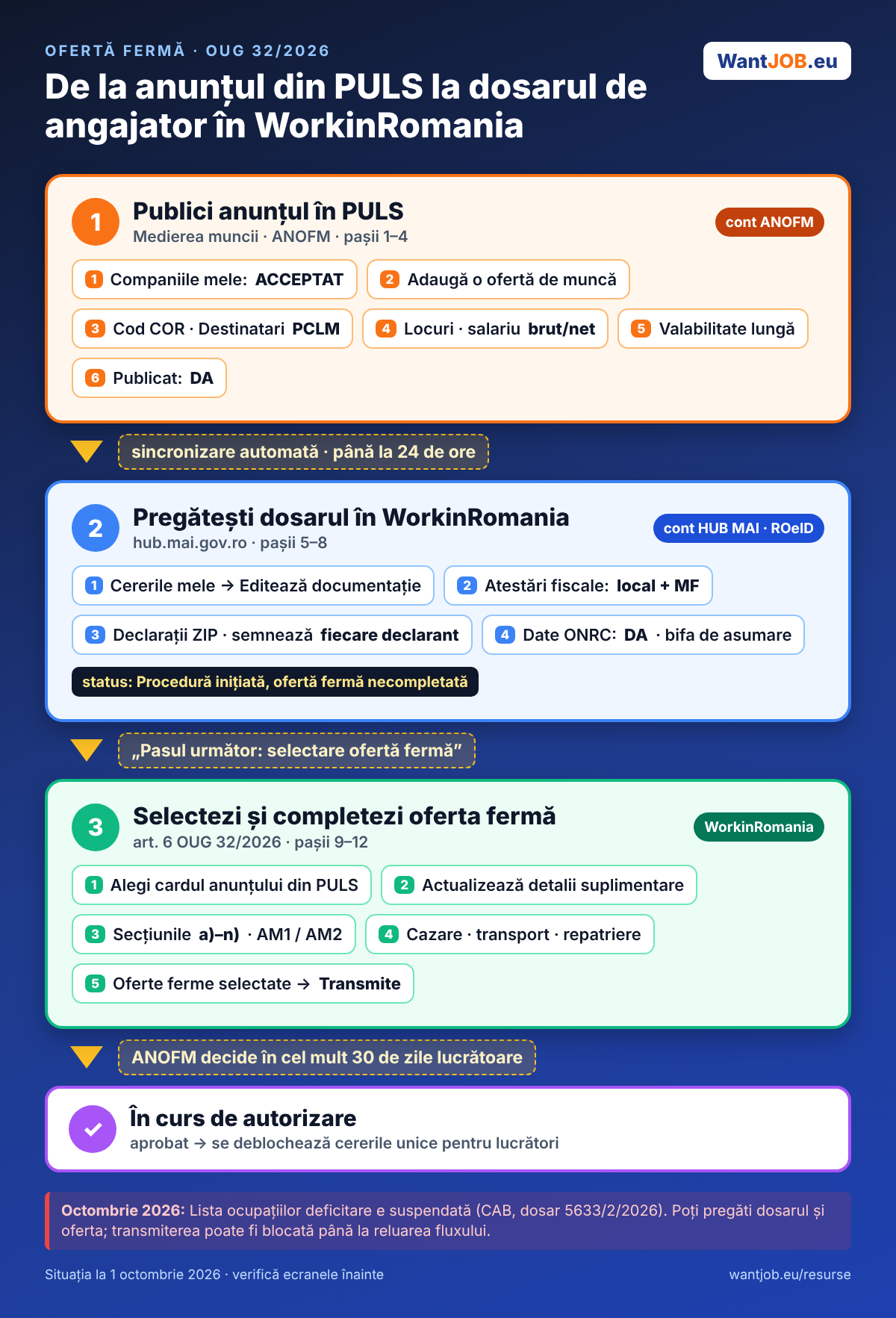
What you need to know first
- The firm offer is no longer written from scratch in WorkinRomania. It starts from a job vacancy published in PULS / Medierea muncii (ANOFM). The law requires the firm offer to contain the job declared vacant at ANOFM (art. 6(3) OUG 32/2026, referring to art. 10 of Law no. 76/2002). WorkinRomania automatically picks up your company's vacancies, and you complete them with the details the law requires.
- You need two different accounts:
- an ANOFM account (sso.anofm.ro, with e-mail and password) for PULS and Mediation;
- a HUB MAI account (hub.mai.gov.ro, with ROeID) for WorkinRomania.
- The vacancy appears in WorkinRomania only if its status in PULS is "PUBLICAT" (published), and only up to 24 hours after publication.
- PULS has no "foreign workers" field. That is normal: the link to foreign workers is made in WorkinRomania, when you select the vacancy as the firm offer.
Warning, situation in October 2026. The List of shortage occupations has been suspended by the Bucharest Court of Appeal (case 5633/2/2026), and the platform announces that the employer registration and authorisation flows are disabled. You can prepare the file and the offer, but submission may be blocked until the flow resumes. Details: what the suspension of Order 1073/2026 means.
Stage 1 — Publish the vacancy in PULS (ANOFM)
Step 1 — Log in to your ANOFM account
On anofm.ro press "PULS / Medierea muncii — Servicii online" (online services) and log in with the e-mail and password of your ANOFM account.
Step 2 — Check the company
In PULS, under "Companiile mele" (my companies), the company must appear linked to your account, with the status ACCEPTAT (accepted). If it does not appear, use "Înregistrează o companie" (register a company) or "Înregistrare ca reprezentant legal la o companie" (register as legal representative of a company).
Step 3 — Add the job offer
From Mediation: Dashboard → "Adaugă o ofertă de muncă" (add a job offer). Fill in the mandatory fields. The most important ones:
- Occupation classification (COR code) — the occupation you are hiring for. For D/AM2 it must be on the List of shortage occupations.
- Recipients ("Destinatari") — choose PCLM (persons seeking employment). There is no option for foreigners, because the vacancy is addressed to the domestic market.
- Number of places (new and/or vacated positions).
- Minimum/maximum salary and salary type (gross/net) — optional in PULS, but fill them in: the value is carried into the firm offer in WorkinRomania.
- Offer validity — choose a date far enough ahead to cover the whole period of the file.
- Published: Yes ("Publicat: Da") — without it, the vacancy does not reach WorkinRomania.
Step 4 — Wait for synchronisation
Allow up to 24 hours for the vacancy to appear in WorkinRomania.
Stage 2 — Prepare the employer file in WorkinRomania
Step 5 — Open the file
Log in on hub.mai.gov.ro → WorkinRomania → "Contul meu" → "Cererile mele" (my account → my applications), then on the row of the file press "Editează documentație" (edit documentation).
If you do not have a file yet: the card "Pentru înregistrare ca angajator - persoană juridică" (registration as employer - legal entity) → "Depune cerere" (submit application) → choose the company → tick the two consents → "Inițiază procedura" (start the procedure). Only the external user (the director, shareholder or legal representative) can start the procedure, not a designated person — see the tutorial on designating a person.
Step 6 — Upload the documents
Under "Documente generale" (general documents):
- Registration application ("Cerere înregistrare") — generated automatically;
- Tax clearance certificate — local authorities;
- Tax clearance certificate — Ministry of Finance.
Then the documents for the persons registered at ONRC (legal representatives, directors, partners, shareholders). The button "Descarcă declarațiile autocompletate" (download the pre-filled declarations) gives you a ZIP archive with the declarations already filled in.
Important: each sworn declaration is signed electronically by the person making it (each partner signs their own declaration), not by the person uploading the file.
Step 7 — Confirm and take responsibility
- At "Confirmați faptul că datele preluate în mod automat din platforma ONRC sunt actualizate" (confirm that the data taken automatically from ONRC are up to date) choose DA (yes).
- Tick the declaration of responsibility. Without it the message "Acest consimțământ este obligatoriu pentru depunerea documentației" (this consent is mandatory for submitting the documentation) appears.
Step 8 — Move on to the firm offer
Press "Pasul următor: selectare ofertă fermă" (next step: select the firm offer). If a mandatory document is missing, the platform stops you here.
In "Cererile mele", the file gets the status "Procedură inițiată, ofertă fermă necompletată" (procedure started, firm offer not completed): the documents are in order and only the offer is missing.
Stage 3 — Select and complete the firm offer
Step 9 — Find the vacancy
The page "Selectare ofertă fermă dosar nr. …" (select firm offer, file no. …) shows your company's vacancies from PULS. Each card shows:
- Offer identifier (the PULS ID);
- the field of activity;
- Available positions;
- a label: Poziții neocupate (unfilled), Poziții ocupate parțial (partly filled) or Poziții ocupate total (fully filled).
You can filter by field or by status. If the vacancy does not appear, check in PULS that it is "Publicat" and that 24 hours have passed.
Step 10 — Fill in the details
On the vacancy card press "Actualizează detalii suplimentare pentru oferta fermă" (update additional details for the firm offer). At the top you see the data taken from PULS (company, county, occupation, period, salary, places), which cannot be changed here. Below, you fill in the elements required by art. 6 OUG 32/2026:
| Section | What you fill in |
|---|---|
| a) Duration of the offer | the start date |
| b) Number of places | how many places you fill with this offer (at most those available) |
| c) Occupation | the qualification (or "Nu există calificare" — no qualification), other conditions, job description |
| Visa type / worker type | AM1 (direct) or AM2 (through an agency); permanent, seasonal, cross-border, highly qualified, citizen of Moldova/Ukraine/Serbia etc. |
| d) Employment | the conditions of hiring, termination and re-hiring |
| e) Working time | hours per day/week/month, daily and weekly rest, overtime pay |
| f) Pay | hourly rate, pay date, payment method (net/gross salary comes from PULS) |
| g) Minimum wage | the national gross minimum wage and the applicable minimum wage |
| h)–i) Bonuses and enforcement of pay rights | bonuses and other rights; cases in which pay rights can be enforced |
| j) Leave | minimum number of days, how it is granted, holiday pay |
| k) Working conditions | conditions, health and safety at work, hygiene, social security |
| l) Taxes | taxes, income tax, contributions; avoidance of double taxation |
| m) Compensation | in case of occupational disease, work accident or death |
| n) Transport and repatriation | who pays for transport (employer or worker) on each leg: country of origin → Romania, border → workplace/accommodation, accommodation → workplace; repatriation conditions |
Letters a)–m) correspond to art. 6(1). Transport and repatriation come from art. 6(2)(b), which requires stating unambiguously whether each cost is borne by the employer or by the foreign worker. The same paragraph, at letter a), also requires the accommodation to be specified (conditions for the whole stay and, where applicable, meals) — describe it clearly in the offer.
Check the salary. We have seen offers in which the net salary is shown equal to the gross: the gross value from PULS seems to be copied into the net field too. If so, correct it in PULS.
The COR code in the header. The "COR" field may show a short number (for example 1634), which is an internal PULS ID, not the 6-digit COR code. The correct occupation is the one written in words.
Step 11 — Check the selection
At the bottom of the page, under "Oferte ferme selectate" (selected firm offers), preview the completed offer (or offers).
Step 12 — Submit the file
Submit the documentation together with the selected offer. The file moves to "În curs de autorizare" (authorisation in progress). ANOFM has at most 30 working days to approve or give reasons for rejecting the registration (art. 5(6) OUG 32/2026).
Summary: the whole circuit at a glance
| Where | What you do | Result |
|---|---|---|
| PULS / Mediation (ANOFM account) | Add a job offer: COR, PCLM, places, salary, validity, Published: YES | vacancy PUBLICAT |
| — | wait for synchronisation | up to 24 hours |
| WorkinRomania (HUB MAI account) | Cererile mele → Editează documentație → documents + declarations (ZIP) → ONRC: DA → responsibility tick | file complete |
| WorkinRomania | "Pasul următor: selectare ofertă fermă" | status: firm offer not completed |
| WorkinRomania | PULS vacancy card → "Actualizează detalii suplimentare" → sections a)–n) | offer completed |
| WorkinRomania | "Oferte ferme selectate" → submit | status: authorisation in progress |
Frequently asked questions
My PULS vacancy does not appear in WorkinRomania. Why?
Three possible reasons: the vacancy does not have the PUBLICAT status, 24 hours have not passed yet, or the company in PULS is not the same (different CUI) as the one in the WorkinRomania file.
Do I still need the certificate from AJOFM?
No. For new applications, the certificate on available labour force is no longer issued. Selecting the PULS vacancy as the firm offer has replaced the old circuit.
Do I have to keep the vacancy published for a minimum number of days?
The law sets no minimum period. What matters is that the vacancy is published and valid at the moment you select it.
Can I use one vacancy for several workers?
Yes, within the limit of the places available in the vacancy. Under "Numărul locurilor de muncă" (number of jobs) you choose how many places the file covers.
What does "Procedură inițiată, ofertă fermă necompletată" mean?
The documents in the file are complete; you still have to select and complete the firm offer (Stage 3).
What if the occupation is not on the List of shortage occupations?
For D/AM2 (through an agency), the occupation must be on the list. For D/AM1 (Moldova, Ukraine, Serbia, highly qualified), the list is not a condition.
This resource is for information only and reflects the situation on 1 October 2026. The official text of OUG 32/2026 (Official Gazette no. 335 of 27.04.2026), of MMFTSS Order no. 655/2026 and the communications of the competent institutions prevail. For specific situations, we recommend consulting a specialist.
Downloads (Romanian)
Read also (Romanian)
- Permisul de ședere (TRC) în România: cât costă, unde plătești și ce riști dacă întârzii
- Doar 39 de angajatori înregistrați, niciunul autorizat: cine rămâne fără acte dacă firmele nu intră în WorkinRomania până la finalul anului
- Riscurile agenției de plasare a străinilor: garanție blocată, suspendare, retragere (OUG 32/2026)